
Definition : #
UX (user experience) is all about making an environment that is liked and wanted by the users of that application or website while keeping in mind the profit and growth of the company. Its not just about the user experience but also about the finding the most optimal solution which results in profit for the organization.
Things to keep in mind - #
-
Keep in mind the users : You should be clear as to who all will be interacting with your product/service. For example, when you make a food delivery app, there are 4 kind of users interacting with the app-
- The Customers ordering the food.
- The restaurants making the food.
- The delivery people delivering the food.
- CSR or Customer service representative who are responsible for resolving the issues of the customers.
-
Listening to the problem and understanding it thoroughly : Jumping straight into finding the solutions is almost never a good idea. We must always try to understand the root cause of the issue and come up with the most optimal solution. The process should be focused on rather than jumping to solutions.
Design Thinking : #
A 5 step process consisting:
1. Empathize #
Understanding our user’s needs through user research. It is crucial to set aside our own assumptions about the world and actually understand what our users’ require.
Problem Statements and User stories #
Since we cant get clients when we are learning UX, we can search up some problem statements online and formulate a user story. We can also ask ChatGPT for help for the above task.
For example: The problem statement that I chose is
Improving a Library Website for Book Search
- Problem: Users find it hard to search for books, check availability, and reserve them online.
- Task: Create a user-friendly book search and reservation system.
The user story for the above problem statement can be :
Alex is a college student who needs a quick and easy way to search for books and check their availability because they often have tight deadlines and don’t have time to browse the library shelves manually.
Discover #
Stake holder Interview #
- Who is your target audience?
- Who is your direct competitor? (if any) and why do you consider them as your competitor?
- What is the USP (unique selling proposition) of your product?
We can again use the help of ChatGPT to ask questions that we would otherwise ask a stakeholder of a company.
For e.g. this is what ChatGPT responded with when I asked the questions above :
Q1.
- University Students – They need quick and efficient access to academic resources for research and coursework.
- Faculty & Researchers – They often look for specific books and journals to support their studies and teaching.
- Casual Readers – Members of the public who visit the library for leisure reading and may want to reserve books in advance.
- Librarians & Staff – They need a system that helps them manage book availability, reservations, and user requests smoothly.
Q2.
- WorldCat – A global catalog that allows users to search for books in libraries near them.
- OverDrive (Libby) – A platform used by many public libraries for borrowing e-books and audiobooks.
- Hoopla – Similar to OverDrive, offering digital media lending.
- NYPL (New York Public Library) App – A well-designed library system that allows book reservations and digital loans.
Try to focus on other app and websites names rather than general answers give by ChatGPT like Other libraries’ catalogues and British Library catalogue. You will obviously not face this problem when talking to an actual stakeholder.
What Sets Us Apart? #
- Integrated Academic & Leisure Resources – Unlike general book platforms, we provide both research materials and leisure reading in one place.
- Real-Time Availability & Smart Reservations – Users can instantly check book availability, get waitlist updates, and receive notifications when a book is ready for pickup.
- Personalized Book Recommendations – Based on past searches and borrowing history, we suggest relevant academic and leisure reads.
- Multi-Format Access – If a book is unavailable in print, we provide alternative formats (e-books, audiobooks, or scanned excerpts when copyright allows).
- Student & Faculty-Centric Features – We integrate with course reading lists, research databases, and citation tools to streamline academic work.
Feel free to ask different questions and what you might ask an actual stakeholder.
Notes/Whiteboard app: #
To keep a track of all the responses given by the stakeholder, we can use apps like Figma and Miro which have whiteboards to keep thoughts and answers organized.
Tabulating information #
After collecting the information, its better to tabulate it. If we take the example of competitor analysis.

(pro tip: Chat GPT works wonders here as well by making a table which you can then make on figma. Just ask the AI to tabulate the competitor analysis with the column names.)
Surveymonkey is a good website to conduct surveys for free and get graphs and results to make the analysis of answers easy. You can also use Microsoft forms or google form etc.
Primary research #
1. Quantitative research: #
- All the data that we get is in numerical form.
- Its better if questions have multiple choices to choose from
- Do not ask for personal information
- User should not think too hard for answering the questions
- Basically creating surveys
(pro tip: Asking ChatGPT here can help us out a bunch as well. Just specify that you want survey questions and their type (mcq with single choice correct, text type, multiple correct answers etc.) and specify the topic of the survey.)
2. Qualitative Research: #
- Asking open ended questions. (questions that have descriptive answers.)
- Select representatives to answer your questions.
Questions like - What is your name Where do you live what is your age
-
Try and record the interview to remember the answers for future references. Then jot down the important points while listening to the recordings.
-
Don’t be biased when asking questions and when replying to answers.
(Pro tip: Asking ChatGPT shines here too. Just specify that you want qualitative research interview questions around whatever topics you want.)
2. Define #
Analyzing the information that we accumulated through the empathize stage to define the core problems that we have identified. These are called the problem statements.
Persona: #
If we have taken 10 interviews and 5 people have same problems and needs then we make one persona (1 imaginary person for the 5 of them) and the other 5 have similar issues so we group them together for making a 2nd persona.
Things to include in a persona Behavior Task Pain points Needs
uxpressia is a website that we can use to make personas.
Custom journey map: #
A journey map is a visual representation of the steps a user goes through to accomplish a goal with a product or service. It helps designers understand the experience from the user’s point of view.
A typical journey map shows:
-
What the user is doing
-
What they are thinking
-
How they are feeling
-
Where they face problems
-
Where there are opportunities to improve
In simple terms, it’s a structured way of saying:
“Let’s walk in the user’s shoes.”
What Makes a Journey Map “Custom”? #
A custom journey map is created specifically for a particular product, feature, or type of user. Instead of using a generic template, designers tailor the journey map to focus on the exact experience they want to understand and improve.
This means the designer chooses:
-
The stages of the journey
-
The emotions to track
-
The pain points to highlight
-
The design opportunities to explore
It’s built around the unique context of the project, not a one-size-fits-all structure.
Point of view statements #
A Point of View (POV) statement is a concise sentence that frames a design problem from the user’s perspective. It is based on research and insights gathered during the empathy and discovery stages of the design process.
It usually follows this format:
[User] needs [need] because [insight].
This simple structure connects:
-
A specific user
-
A meaningful need
-
A deeper reason or motivation
A good POV statement is:
User-centered – Focused on people, not the product
Insightful – Based on real observations, not guesses
Actionable – Leads to clear design opportunities
Specific – Targets a defined group and situation
3. Ideate #
Stage where we can come up with ideas and start thinking outside the box. Brainstorming and coming up with innovative solutions is needed to be done here.
Information Architecture: #
Helps us understanding navigation of the app/software. Has many flows inside of it.
We build IA using xmind.
Task Flow #
A task flow shows the single, ideal path a user takes to complete one specific task. It focuses only on the steps required to successfully reach a goal, without exploring alternative routes or edge cases.
In simple words, a task flow answers:
“What is the main sequence of steps a user follows to complete this task?”
Key Characteristics of a Task Flow #
-
Focuses on one task only
-
Shows a linear and straightforward path
-
Does not include decision branches
-
Represents the happy path (ideal scenario)
Example of a Task Flow (Ordering Food) #
-
Open the food delivery app
-
Search for a restaurant
-
Select items
-
Add items to cart
-
Proceed to checkout
-
Make payment
-
Order confirmed
User flow #
A user flow shows all the possible paths a user can take to complete a goal. It includes different entry points, decision points, and alternate routes depending on user behavior.
In simple words, a user flow answers:
“What are all the ways a user might move through the product to achieve their goal?”
Key Characteristics of a User Flow #
-
Covers multiple paths
-
Includes decision points (yes/no, success/failure)
-
Shows different user behaviors
-
Connects multiple screens and interactions
Example of a User Flow (Ordering Food) #
A user might:
-
Log in or continue as a guest
-
Search for food or browse categories
-
Add items or remove items
-
Apply a coupon or skip it
-
Choose online payment or cash on delivery
-
Retry payment if it fails
4. Prototype #
Experimental stage where we have to identify best possible solution by making a scaled-down version of the product to test your solution.
5. Test #
Evaluators test the prototypes and this is the final stage but you can still go back to the previous stages to refine and alter your solutions to make them better.
Laws of UX #
There are certain laws which are used by designers to enhance the user experience. These laws need not be learned by heart but its better if you are aware and if you know what they are.
Hick’s Law #
States that the more options a user is presented with, the longer it will take them to make a decision.
This doesn’t always mean you should lessen the options as maybe in your project you want users to see more options but you should keep them to a minimum and focus on the primary task that the user might focus on.
Fitts’s Law #
States that the amount of time taken to move to and select a target is a function of the distance to and size of the target.
Basically means that the things that you want the user to select should be larger and in spots that are easier to click and spot and the options that you want to be harder to select should be smaller.
Tesler’s Law #
Systems have an inherent amount of complexity that cannot be reduced also known as “The Law of Conservation of Complexity.”
Basically means that simple doesn’t always mean easier. There is always a minimum level of complexity that’s always going to remain in your product. Making something simpler for a user is gonna add more complexities in certain other areas. Sometimes friction can help the user.
Miller’s Law #
States that the average person can only keep 7 (+ or - 2) items of information in their working memory at a time.
Always put options in groups of 5-9 in order to not overload the memory. E.g.- Grouping numbers together in a phone number- 9568-679-721 It can also make it easier for people to look for some particular information.
Pareto Principle #
The Pareto Principle (or the 80/20 rule) states that 80% effects come from 20% of the causes.
Helps us to understand that we should focus on the most important things and that the relationship between input and output is generally uneven. Its not mathematically accurate though.
Doherty Principle #
If a computer responds to a user input in less than 400 ms, the user will take less time to make their next decision.
It is important to show some feedback to the user within 400ms in order to keep them engaged. Loading bars can be used to let the user know that their request is being processed an the longer it takes the system to respond, the longer the user will take to make the next action.
Jakob’s Laws #
States that users spend more time on other websites so they expect your website to work in the same way, that they are already familiar with.
Certain options in your website should be kept in certain places similar to other websites so it becomes easier for users to spot it easily. You should know what products your users will be using so you can create similar design patterns. UI patterns is a great website to research some patters.
Von Restorff Effect #
aka The Isolation Effect states that users are more likely to remember an object if it is visually different from similar objects.
If you want an option to be noticed, make it visually different but make too many objects stand out as that lessens the effect.
Aesthetic-Usability Effect #
States that users often perceive visually-pleasing products as being easier to use.
Well mad designs can disguise minor UX issues but will also make them harder to discover issues in the testing phase. Dribbble and Behance are good websites to help you discover good designs.
Color Theory
3 categories of color theory:
The color wheel #
Circle based on red yellow and blue (primary colors). The secondary colors - Green, Orange and Purple are formed by mixing the primary colors. The tertiary colors - Colors formed by mixing a primary and a secondary color.
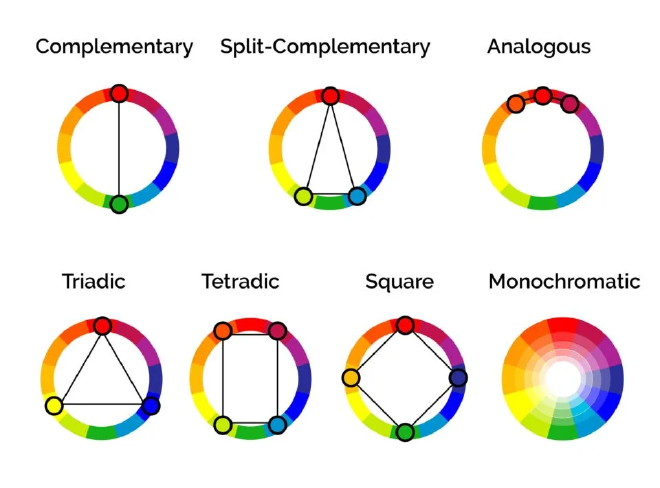
Color Harmony #
A sense of order or harmony that the viewer sees to create a balance in the visual experience. Its based on the color wheel.
Color Psychology #
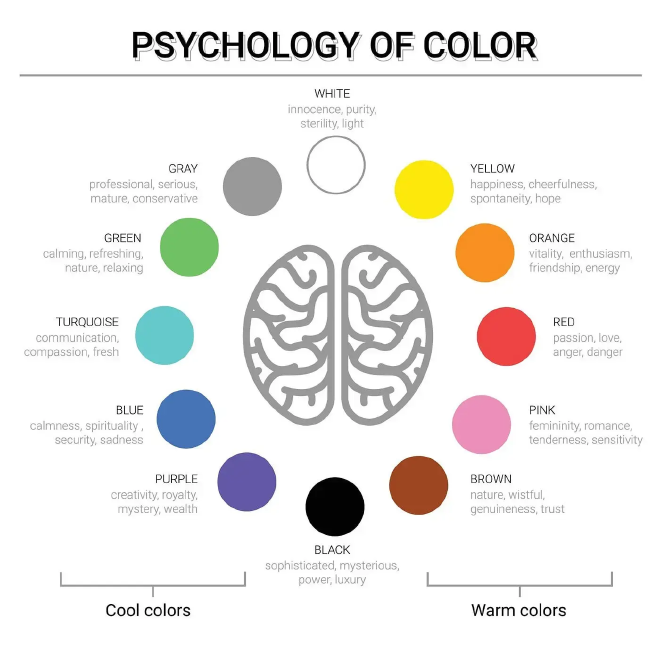
Colors also have meaning and they must be used in accordance to the meaning and the scope of the brand. For example Blue is not generally used with food brands as it is considered ‘poison’.
Typography #
Typeface #
Collection name of a family of related fonts. Types- Serif, Sans Serif and Decorative.
Font #
Refers to weights, widths, and styles that constitute a typeface (like Times New Roman Regular, Italic, Bold etc.)
Hierarchy #
Used to maintain order and keep your ideas organized so it is easily recognizable for viewers.
Contrast #
Helps in emphasizing particular information by varying size, typeface, weight, color etc.
Consistency #
Do not use too many types of fonts as the can lead to be confusing and messy so use the same font for styling the same information.
Alignment #
Refers to where the text orients towards. It can be applied to a whole body of text, individual words, or even images. Should be consistent. 4 types - 6. Left 7. Right 8. Justified - Stretches or compresses spaces between words to align both the left and right margins of a line. 9. Center
Whitespace #
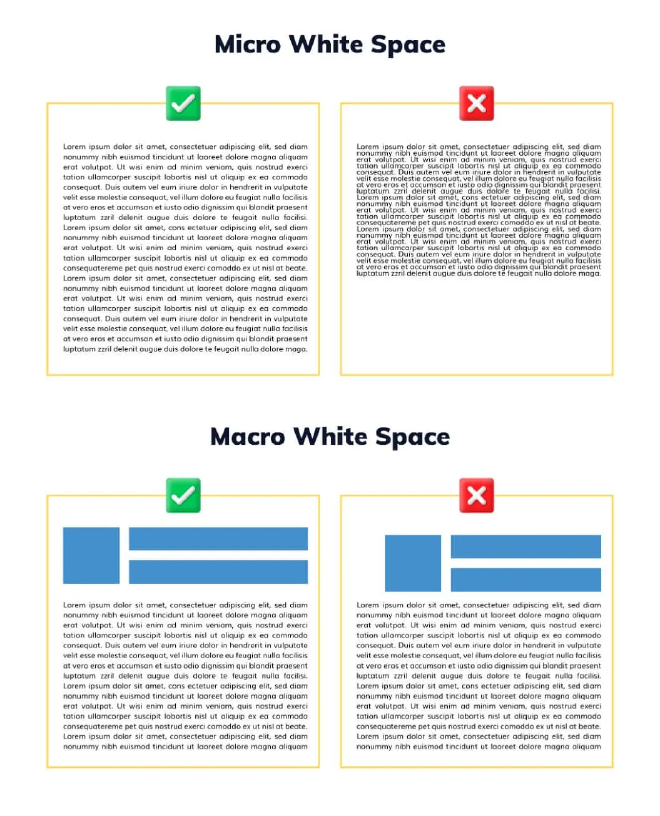
Empty space around the objects or text , and can take the form of margins, padding or just an uncluttered area. Creates a visually pleasing experience.
UX is quite a diverse field! This is just some of what I learned during my certification course. Here’s to more learning through experience! 🥂